FlyBeeper Pressure Sensor
Always available for Bluetooth connection external barometer. High sensitivity and stability with minimal delays. Turn any smartphone into a reliable variometer.
No public firmware build yet.
Changelog
Changelog
Version: 0.04 | Date: 19.05.2024 | Download
- Hibernate mode: Mode for transportation and long-term storage. For hardware 0.4+ double-clicking the reset button with a pause of 1-2 seconds between clicks switch the device into deep sleep and stops sending advertisements. The device is no longer available for connection. To put the device into operating mode, you must press the reset button once again.
- Bugfix battery life: For some unknown reason, the BLE connection mode (firmware 0.03) did not execute the command to switch to the mode of rarely sending advertising packets. Advertising packets were sent with very high frequency providing instant detection on the one hand, but drained the battery very quickly while waiting for a connection. Fixed. The radio power has also been slightly reduced, which will also reduce power consumption and slightly reduce the detection radius.
Version: 0.03 | Date: 07.05.2024 | ⚠️WARNING ⚠️contains a bug
- BLE connect mode: Faster Bluetooth connection immediately after turning on the power or press reset button or after disconnecting. The mode is active for 5 minutes. Allows you to quickly find a device or reconnect.
- Bugfix pressure sensor: The device turns on, but the pressure is read as 0. Added delay for sensor preparation.
- Increasing battery life: - disabling unused MC features.
Version: 0.02 | Date: 12.02.2024 | Download
- Battery voltage by bluetooth: New battery characteristic available to notify.
Manual
FlyBeeper Pressure Sensor
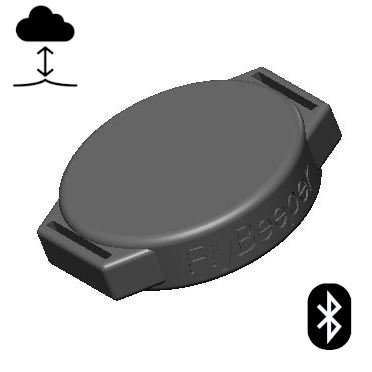
Manual
Control
The device has no controls. After installing the power battery, the device is ready for connection. Reset is done by briefly removing the battery.
Operating Modes
The device operates in two modes. Immediately after installing the battery, the device enters Bluetooth connection standby mode. Every 5 seconds, the device broadcasts an advertising packet, allowing it to be detected for connection initiation. During intervals between advertising packets, the device sleeps. Once the device receives a connection request, periodic battery level measurement is activated. Connection does not require a pairing procedure. After establishing a connection, the battery level can be read, and subscription to changes in atmospheric pressure can be made. In the latter case, periodic reading of data from the barometric sensor is activated at a frequency of 40 times per second. The data is filtered, smoothed, and sent to the subscriber 10 times per second. During intervals, the device sleeps. Upon disconnecting the Bluetooth connection, the device returns to the standby mode with periodic broadcasting of advertising packets.
Configuration
You can test the device through the graphical interface. You need device with Bluetooth, such as a smartphone, laptop, or computer with a Bluetooth module. Press Connect and select FbPs1 from the list. Keep the devices as close to each other as possible.
At the current point, the device does not have accessible settings, but new firmware updates will include the ability to change the sensor polling frequency and data transmission frequency.
List of Flight Programs with Direct Support
- xcTrack v.0.9.11.10+
- SeeYou Navigator v.3.0.6+
- LK8000 v.7.4.19+
- Flyskyhy v.8.2+
- FlyMe
- TheFlightVario XC 2.38+
- maps.flybeeper.com
Soon:
- Flygaggle
Communication Protocol Description
This section is intended more for developers than for regular users.
The device operates using the BLE protocol without pairing and authorization. Changes to each parameter are available via subscription (descriptor 0x2902). All non-standard parameters have 128-bit UUIDs, descriptor 0x2901 with a textual parameter name, and descriptor 0x2904 with a description of the format, exponent, and unit of measurement. For convenience, their values are listed in the tables below.
Characteristics UUID for service 0x181A ESS
| Name | UUID | Size | Exponent | Unit |
|---|---|---|---|---|
| Temperature | 0x2a6e | INT16 | -2 | Celcius |
| Pressure | 0x2a6d | UINT32 | -1 | Pascal |
Characteristics UUID for service 0x180F BAS
| Name | UUID | Size | Exponent | Unit |
|---|---|---|---|---|
| Battery level | 0x2a19 | UINT8 | 0 | Percent |
| Battery voltage | b0c889e8-16d2-45ef-b615-387f6bca2370 | INT16 | -3 | Volt |
Characteristics UUID for service 0x180A DevInfo
| Name | UUID | Size | Value |
|---|---|---|---|
| Model Number | 0x2A24 | STRING | FBPS |
| Manufacturer Name | 0x2A29 | STRING | FlyBeeper |
| Firmware Revision | 0x2A26 | STRING | 0.01 |