FlyBeeper Baro
Always available for Bluetooth connection external barometer. High sensitivity and stability with minimal delays. Turn any smartphone into a reliable variometer. This page covers both the FlyBeeper Baro and its predecessor, the Pressure Sensor (FBPS1) — they share one firmware.
No public firmware build yet.
Changelog
Changelog
Version: 0.29.0 | Date: 17.09.2026 | Download
- Clean shutdown on a flat coin cell: the battery is now measured, and when it drops below 2.4 V the device switches itself off instead of rebooting over and over on a dying cell. It checks every 10 minutes and needs two low readings in a row; at power-on it refuses to start if the cell is within 0.1 V of that limit.
- Longer battery life after using the app: the pressure sensor kept being polled 40 times a second after the phone disconnected, until the next restart — an extra 30–50 µA from the coin cell. It now stops as soon as nothing is subscribed.
Version: 0.28.3 | Date: 30.08.2026 | Download
- Quiet on the ground now follows the ground: the reference pressure is re-taken every 10 seconds while you stand, so barometer drift no longer looks like a take-off, and a device switched on down in the valley and carried up to launch treats the launch as the ground after a minute. A take-off is a climb of 2 metres from that reference; a landing is a minute of stillness within half a metre.
- Over-the-air update made robust: the hardware watchdog keeps running through the software reset that starts an update and could fire inside the bootloader’s image check right after the swap finished, sending the device back to the old version. Its window is now 6 seconds. On firmware older than this version the configurator installs the update in permanent mode to get past that watchdog.
- More headroom for updates: the Bluetooth transfer buffer was trimmed, which frees 3 KB of memory. Updating takes slightly longer and is more reliable.
- Rebuilt on the shared FlyBeeper firmware base: the device now runs the same firmware family as the rest of the line instead of its own separate branch. It keeps its own signing key, so this update installs over the air on units already in the field, and firmware from other FlyBeeper devices still cannot be flashed onto it by mistake.
- Power off by double reset: two presses of the button with about a second between them switch the device off; a single press turns it back on. The window flag now only counts a press of the button itself, so inserting a fresh battery can no longer switch the device off right after it starts.
- Faster to find: after power-on or a button press the device advertises rapidly for 30 seconds, then settles into the economical 1.28 s interval — roughly two years from a CR2032.
- Pressure output without extra lag: the Butterworth filter is disabled on this device. It exists for computing vario by differentiation; a device that only reports pressure gained nothing from it but delay. Median filtering and averaging before each notification remain.
Version: 0.04 | Date: 19.05.2024 | Download
- Hibernate mode: Mode for transportation and long-term storage. For hardware 0.4+ double-clicking the reset button with a pause of 1-2 seconds between clicks switch the device into deep sleep and stops sending advertisements. The device is no longer available for connection. To put the device into operating mode, you must press the reset button once again.
- Bugfix battery life: For some unknown reason, the BLE connection mode (firmware 0.03) did not execute the command to switch to the mode of rarely sending advertising packets. Advertising packets were sent with very high frequency providing instant detection on the one hand, but drained the battery very quickly while waiting for a connection. Fixed. The radio power has also been slightly reduced, which will also reduce power consumption and slightly reduce the detection radius.
Version: 0.03 | Date: 07.05.2024 | ⚠️WARNING ⚠️contains a bug
- BLE connect mode: Faster Bluetooth connection immediately after turning on the power or press reset button or after disconnecting. The mode is active for 5 minutes. Allows you to quickly find a device or reconnect.
- Bugfix pressure sensor: The device turns on, but the pressure is read as 0. Added delay for sensor preparation.
- Increasing battery life: - disabling unused MC features.
Version: 0.02 | Date: 12.02.2024 | Download
- Battery voltage by bluetooth: New battery characteristic available to notify.
Manual
FlyBeeper Baro
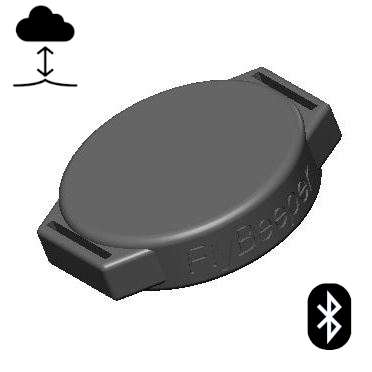
This manual covers both the FlyBeeper Baro and its predecessor, the FlyBeeper Pressure Sensor (FBPS1): same electronics, same firmware. The one difference is the button — the Baro has one, the FBPS1 does not.
Manual
Control
FlyBeeper Baro (round enclosure). There is one button, and it does two things:
- One press wakes the device and makes it advertise frequently for a while, so your phone finds it in a second instead of waiting for the next beacon. The same press brings it back from storage mode.
- A double press with a 1–2 second pause puts it into deep sleep: advertising stops, the device cannot be connected to, and it draws almost nothing. This is the mode for transport and long storage; one press brings it back.
FlyBeeper Pressure Sensor (FBPS1, the predecessor). It has no button at all: the device is ready to connect as soon as the battery is in, and a reset is done by briefly removing the battery. Everything else — the operating modes, the pressure stream, firmware updates — is identical on both devices.
Nothing else controls the device: it has no screen, no LED and no sound — your flight app does all of that.
Operating Modes
The device operates in two modes. Immediately after installing the battery, the device enters Bluetooth connection standby mode. Every 5 seconds, the device broadcasts an advertising packet, allowing it to be detected for connection initiation. During intervals between advertising packets, the device sleeps. Once the device receives a connection request, periodic battery level measurement is activated. Connection does not require a pairing procedure. After establishing a connection, the battery level can be read, and subscription to changes in atmospheric pressure can be made. In the latter case, periodic reading of data from the barometric sensor is activated at a frequency of 40 times per second. The data is filtered, smoothed, and sent to the subscriber 10 times per second. During intervals, the device sleeps. Upon disconnecting the Bluetooth connection, the device returns to the standby mode with periodic broadcasting of advertising packets.
Configuration
You can test the device through the graphical interface. You need device with Bluetooth, such as a smartphone, laptop, or computer with a Bluetooth module. Press Connect and select FBPS from the list (the four characters after the dot come from the device ID). Keep the devices as close to each other as possible.
At the current point, the device does not have accessible settings, but new firmware updates will include the ability to change the sensor polling frequency and data transmission frequency.
List of Flight Programs with Direct Support
- xcTrack v.0.9.11.10+
- SeeYou Navigator v.3.0.6+
- LK8000 v.7.4.19+
- Flyskyhy v.8.2+
- FlyMe
- TheFlightVario XC 2.38+
- maps.flybeeper.com
Soon:
- Flygaggle
Communication Protocol Description
This section is intended more for developers than for regular users.
The device operates using the BLE protocol without pairing and authorization. Changes to each parameter are available via subscription (descriptor 0x2902). All non-standard parameters have 128-bit UUIDs, descriptor 0x2901 with a textual parameter name, and descriptor 0x2904 with a description of the format, exponent, and unit of measurement. For convenience, their values are listed in the tables below.
Characteristics UUID for service 0x181A ESS
| Name | UUID | Size | Exponent | Unit |
|---|---|---|---|---|
| Temperature | 0x2a6e | INT16 | -2 | Celcius |
| Pressure | 0x2a6d | UINT32 | -1 | Pascal |
Characteristics UUID for service 0x180F BAS
| Name | UUID | Size | Exponent | Unit |
|---|---|---|---|---|
| Battery level | 0x2a19 | UINT8 | 0 | Percent |
| Battery voltage | b0c889e8-16d2-45ef-b615-387f6bca2370 | INT16 | -3 | Volt |
Characteristics UUID for service 0x180A DevInfo
| Name | UUID | Size | Value |
|---|---|---|---|
| Model Number | 0x2A24 | STRING | FBPS |
| Manufacturer Name | 0x2A29 | STRING | FlyBeeper |
| Firmware Revision | 0x2A26 | STRING | 0.01 |